
Night sound chart explained
What the night sound chart actually shows
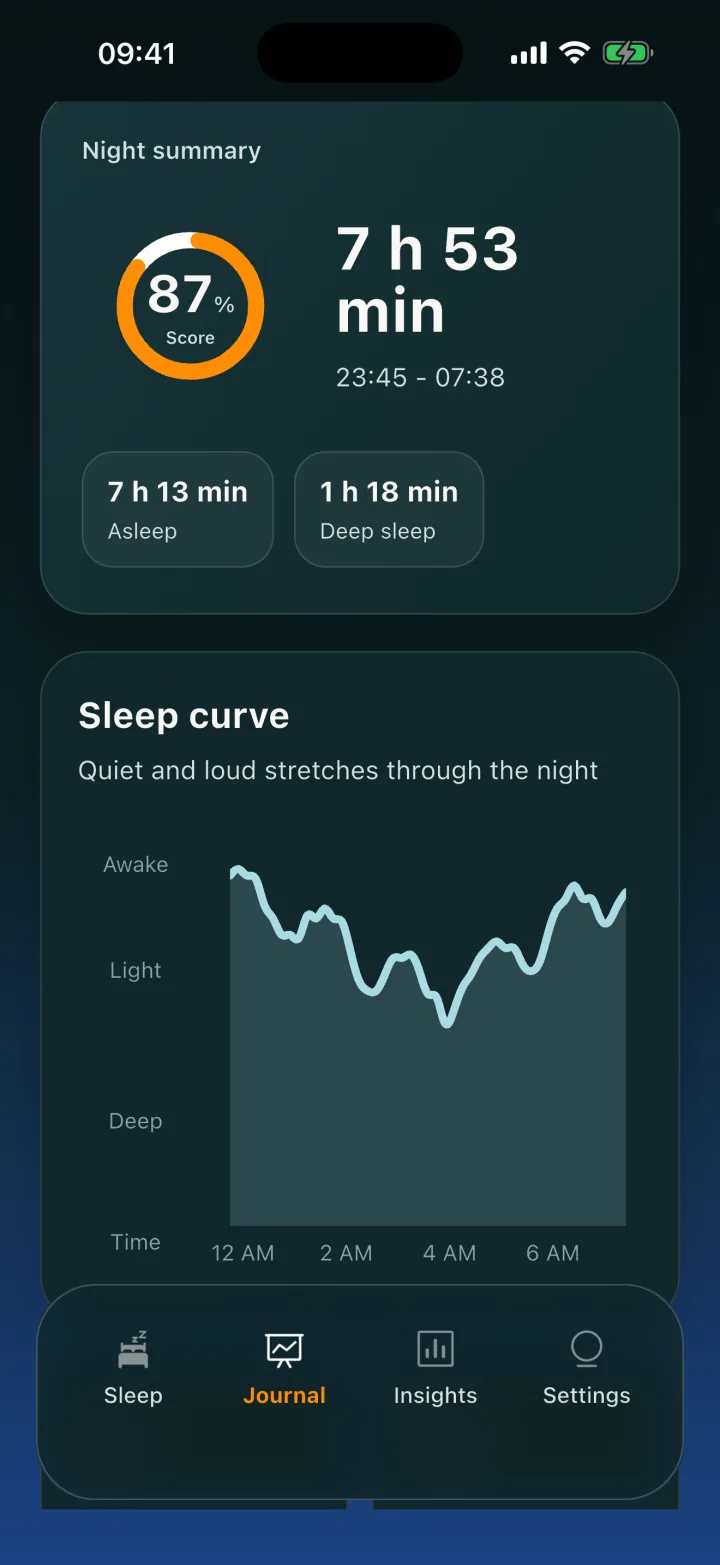
Restful’s optional overnight chart shows relative sound level changes in your room. It does not detect sleep or measure sleep stages, and it is not a medical measurement.
During an overnight session, the iPhone microphone records short pieces. On the phone, each minute becomes one uncalibrated sound value. The App compares values within that same night; quieter and louder stretches appear on the chart.
Checked 25 September 2026 · Released App version 1.0.7 · US price is a dated observation
How it works
Read the chart honestly
Start and end are button times
The session begins when you start it and ends when you stop it or the App ends it. These are not detected sleep-onset and wake times.
Relative sound, not sleep stages
The released App still displays legacy deep, light, awake labels and a score. Those labels are derived from relative sound levels; they have not been validated against measured sleep stages. A quiet person who is awake can appear “deep”.
Compare only within one night
The values are not calibrated decibels and are scaled against the same session. A fan, partner, or the App’s own sleep sounds can change the curve.
The details
What happens to recording pieces
Audio processing occurs on the phone; Restful does not upload audio or journals. Version 1.0.7 deletes new recording pieces after analysis and at session end, and clears earlier local leftovers when it opens.
Versions through 1.0.6 could leave raw pieces on the phone. Copies already contained in older iCloud or computer backups cannot be deleted by the App.
Crash reports and App-session records do go to Sentry. They do not contain the microphone audio or journal database. Read the privacy policy for the broader data explanation.
Limits
Session conditions and gaps
- Keep the iPhone near the bed and charging for an overnight session. If it is not charging after the screen has been dark for about an hour, the session can end without a journal.
- An interruption such as a call can leave missing minutes; a longer interruption may appear as a gap rather than a quiet or “deep sleep” period in version 1.0.7.
- A seven-night history is required before the Insights trends fill in. That threshold does not make the sound curve a validated sleep measurement.
A direct answer
Can this chart tell me how long I slept?
No. It knows when the App session started and ended, and how sound varied during that session. It cannot tell whether you were asleep, awake but still, in REM, or in a deep stage.
For storage, diagnostic and backup details, read the privacy policy. The press kit also covers what changed in version 1.0.7.