Start with rain
A dedicated rain preview before choosing the sound you want to settle into.
 RestfulCurrent App · US$2.99
The next Restful update
Coming soon即将推出
We’re preparing a simpler way to start with rain, shape a sound mix and return to it next time.
Coming soon: free to install, with a trial lasting seven days and a permanent unlock you choose to buy.
This offer is not available yet. The planned trial ends without an automatic charge. No subscription is planned.
Current paid App 1.0.9
Audio never uploadedSleep timer
10 / 15 / 20 / 30 min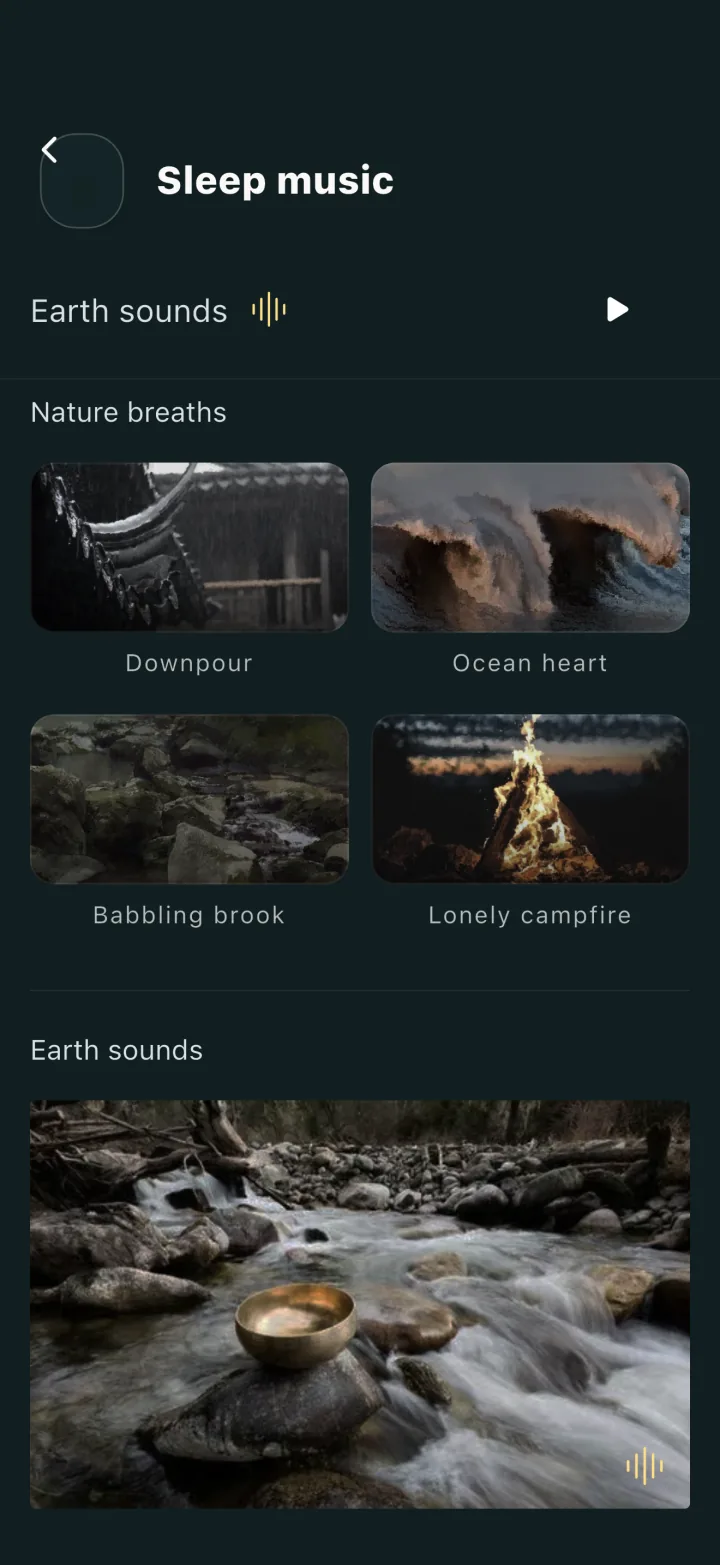
Current paid App 1.0.9 shown. The next Restful update is coming soon. Mixer and nap controls are described on their own pages.
A calmer place to begin
We’re building on the mixer already in the current App. The planned rain preview and clearer restore entry are not available yet.
A dedicated rain preview before choosing the sound you want to settle into.
Already available in the current paid App: adjust individual sound levels to make the mix your own.
A clearer restore entry to bring back the sounds and levels you chose.
The sounds
In the App, each of ten channels has its own volume slider. Audio plays only when you choose it; the web page never requests microphone access.
The sounds play inside the Restful app on iPhone and iPad. Nothing is downloaded or played on this page.
See how the mixer worksRest when you need to
Choose unlimited, 10, 20, 30 or 60 minutes, or set a custom nap up to six hours. A nap is timed and woken, never microphone-recorded. Its wake-up and the separate sound timer do different jobs.
See the nap choicesAvailable today
Ocean, stream, rain, thunder, wind, campfire, crickets, singing bowl, cafe and white noise each have a separate volume control.
The released App has no subscription, in-app purchase or ads. The US price was USD 2.99 on 6 October 2026; check the Store for today’s local price.
Choose 10, 15, 20 or 30 minutes for audio playback to stop.
Choose unlimited, 10, 20, 30 or 60 minutes, or a custom nap up to six hours, with a selected wake tone. Naps are not recorded.
Requires iOS 13.0 or later. Interface languages: English, Simplified Chinese, Japanese and Korean. No Android version.
Audio and journals are not uploaded. The microphone records only on a night you turn the optional sound curve on, and the curve shows relative room sound, not sleep stages; crash and app-session records go to Sentry.
The facts
What the app is, what it costs, and what it does not do — in one place, so you do not have to read a landing page to find out.
What you get
Fall asleep with sound, wake to the tone you chose, and, if you turn on the optional sound curve, review a morning summary that is easy to scan.
Start the night with calming sound and let the timer stop playback for you.
Off by default. Turn it on for a night and the iPhone microphone charts how loud your room was, compared only with that night. No watch or ring needed.
A recorded night gets a Journal entry with its session times and relative sound curve. After seven, Insights compare session length and timing.
How it works
Choose a sound at bedtime, set your wake-up, and turn on the optional sound curve if you want to read the night’s room sound in the morning.
01
Pick a soundscape or mix your own, set a timer, and let the room settle with you.
02
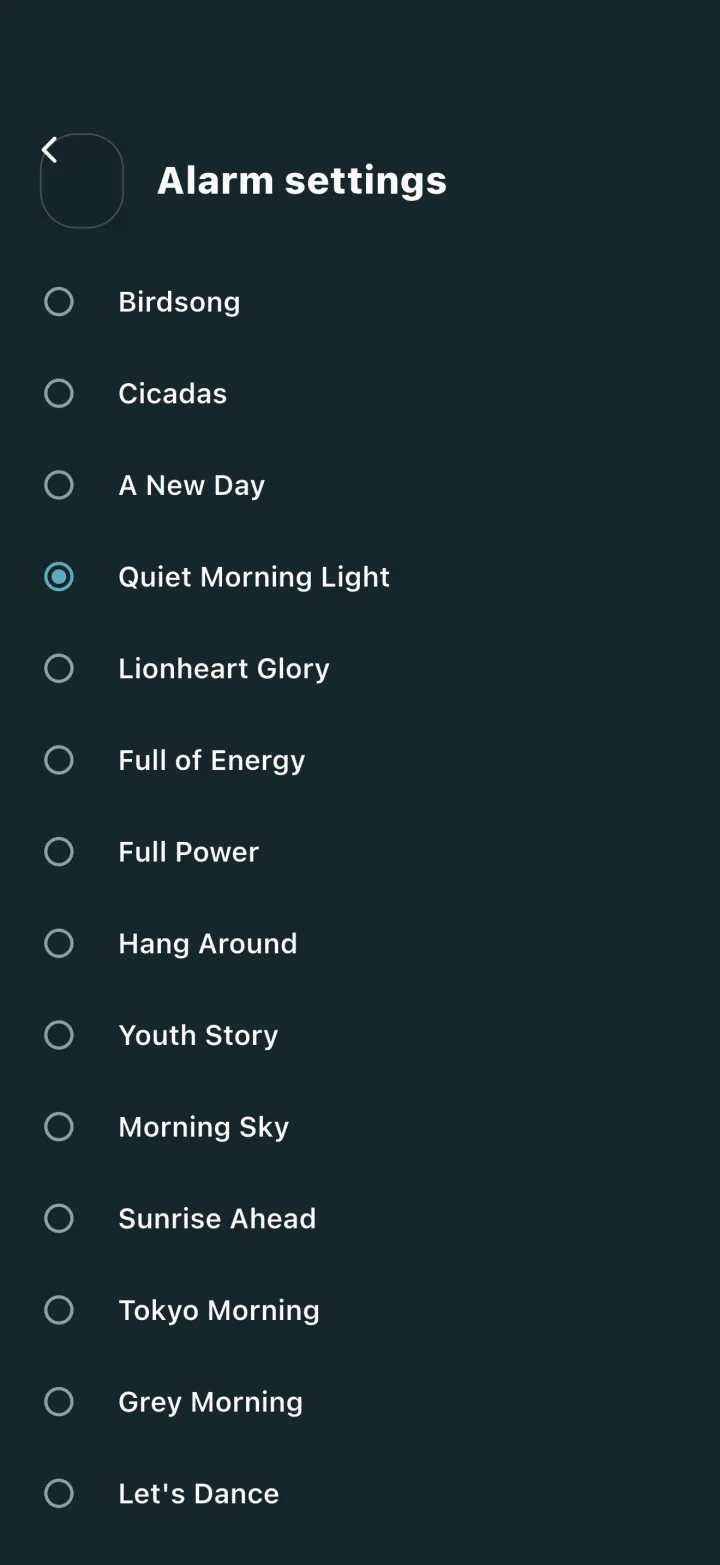
Pick a wake tone and start the night. The sound curve is off by default; turn it on and Restful asks for the microphone as the night starts, so keep the phone plugged in by the bed.
03
After a recorded night, the Journal shows its session times and relative sound curve. Insights fill in once you have seven recorded nights.
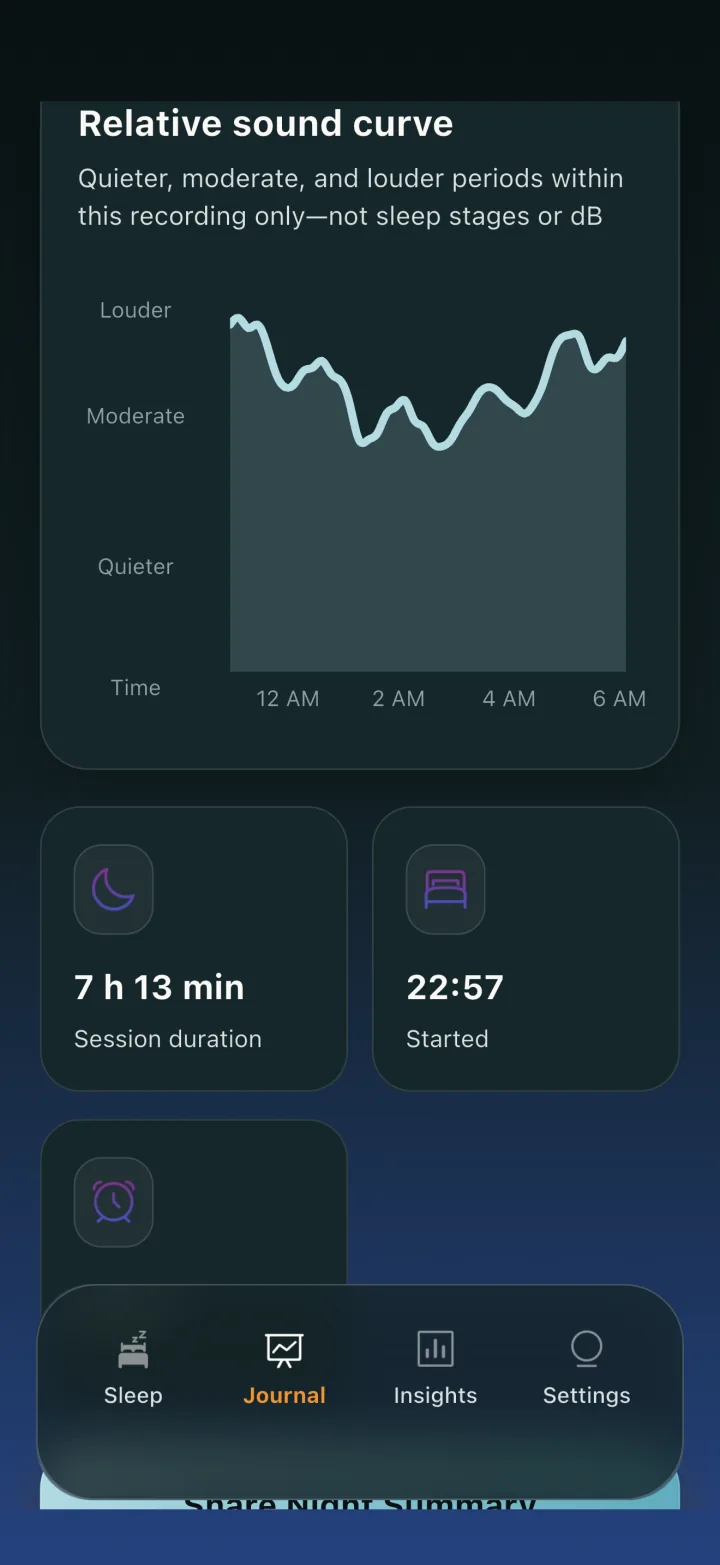
Screens were captured from Restful 1.0.8 and are unchanged in released 1.0.9; they show sample data. The curve shows relative room sound only; Quieter, Moderate and Louder are sound levels within that night, not sleep stages.
Privacy and trust
The microphone is used only on nights you turn the sound curve on, and only to chart that night, on the phone. Restful never uploads audio or journals.
What the night sound chart actually showsThe microphone records only on a night you turn the sound curve on. Each minute of audio is reduced to one number on the device and never uploaded; since version 1.0.7, pieces are deleted after analysis and at session end. Copies already in older backups may remain.
Sleep journals live in a local database on the phone, with no account, and are never uploaded. Crash reports and app-session records do go to Sentry, a crash-reporting service, without audio or journal data.
The current App Store listing is a one-time purchase, and the released app has no subscription or in-app purchase.
Questions
Straight answers about sounds, naps, current purchase terms, and what the optional room-sound chart does not measure.
No. Restful’s sound mixer and nap timer run on the phone. Its optional room-sound curve uses the phone microphone, but needing no wearable does not make it an equivalent sleep detector.
The curve is off by default. On a night you turn it on, each minute of microphone input becomes one uncalibrated sound value on the phone, compared only with the same night. Version 1.0.8 labels the curve Quieter, Moderate and Louder; earlier versions put deep, light and awake labels on the same relative values. None of these are measured sleep stages.
No. Restful does not detect sleep. A quiet person who is awake can look the same as a quiet person who is sleeping. A fan, partner or the App’s own sounds can change the curve. No validation against a sleep study or wearable has been established here; the curve records relative room sound, not how you slept.
Only on a night you turn the optional sound curve on; it is off by default, and naps are never recorded. Audio is then recorded in one-minute pieces and analysed on the phone; no audio is uploaded. Versions through 1.0.6 could leave pieces on the phone and in device backups. Since version 1.0.7, pieces are deleted after analysis and at session end, and earlier local leftovers are removed when the app opens. Copies already in older backups cannot be removed by the app.
In the US, Restful cost USD 2.99 on 6 October 2026. Check the App Store for the current local price. The released app has no subscription, in-app purchase, advertising, or paid tier.
Only if you turn on the optional sound curve. Then keep the phone charging near the bed: if the screen stays locked on battery power for about an hour, the recording stops and no curve or Journal entry is saved for that night, while the alarm timer keeps running. Ordinary sound playback does not require charging for a full night.
After a night recorded with the optional curve, a Journal entry with session length, the times you started and ended, and a relative sound curve marked Quieter, Moderate and Louder. You can save the summary as an image. Version 1.0.8 no longer shows the score or the Asleep and Deep sleep figures, and a night without the curve is not saved to the Journal.
The Journal starts with your first recorded night. The Insights tab needs seven recorded nights before it fills in, because averages and weekday patterns are not meaningful before that. It then compares session length and start and end times over 7 days, 4 weeks, 120 days, or every night you have recorded.
Four full-length nature tracks - heavy rain with thunder, ocean, a babbling brook, and a lone campfire - plus four night-city ambiences for Tokyo, New York, Paris, and Shanghai. There is also a ten-channel mixer you blend yourself: ocean, stream, rain, thunder, wind, campfire, crickets, singing bowl, cafe, and white noise, each with its own volume slider, and your mix is remembered. A 10, 15, 20, or 30 minute timer stops playback. On a night recorded with the curve, Restful’s own sounds reach the microphone and count toward that night’s curve.
No. Restful has a fixed-time alarm with 17 wake tones, shake-to-snooze, a snooze interval you choose, and a limit on how long you can keep snoozing. It does not move your alarm inside a wake window based on the sound curve.
Yes. Nap mode is its own screen with its own length picker - unlimited, 10, 20, 30, or 60 minutes, or a custom length up to six hours - and it wakes you with the tone you chose. Naps use the same sound library as overnight sleep. Naps never use the microphone, so they are timed and woken but not charted.
Compare the specific task and current offer. Those apps combine different free and paid sound, content or analysis features; their listings were checked on 25 September 2026. Restful’s released app is a one-time purchase for sound mixing and naps, and its room-sound curve is not an equivalent sleep detector. Check the dated comparison pages and current local App Store terms.
There is no account and no sign-in. Sleep journals are stored in a local database on the device, and the app works offline. Restful never uploads audio or journal data, although, like other app data, journals are included in your iCloud or computer backups if you use them. The app does send crash reports and app-session records to Sentry, a crash-reporting service; they include device details and timestamps but no audio or journal data.
iPhone and iPad running iOS 13.0 or later. There is no Android version. The app interface is available in English, Simplified Chinese, Japanese, and Korean.
Restful was previously listed on the App Store as “Restful by DoWhiz” and then as “Restful: Sleep Tracker & Sound”. Since version 1.0.7 it has been “Restful: Sleep Sound Mixer”: the same app (App ID 6762536221) from the same seller, Curastone CORP. The earlier names do not describe what it does: Restful does not detect sleep or measure sleep stages. Search results can show the earlier names until they update.
No. Restful supports general wellness and sleep habits. It is not a medical device, and it does not diagnose, treat, cure, or prevent any condition. If you have ongoing concerns about your sleep, speak to a doctor.
Compared
These apps serve different sound, content and analysis needs, with free and paid offers checked on the US App Store on 25 September 2026. A room-sound curve is not equivalent to sleep detection. Each comparison describes the documented features and their limits.
Download
Restful 1.0.9 is US$2.99 in the US; local prices vary. Mix the included sounds and set a nap timer. The released app is paid upfront with no subscription or ads. The next Restful update’s planned offer is not available yet.
Requires iOS 13.0 or later. Charging near the bed is a condition for the optional sound curve, not for ordinary sound playback.